
Before placing coffee, cocoa, rubber, palm, soy, wood or cattle (and their Annex I derivatives) on the EU market or exporting them, the operator must submit a due diligence statement (DDS) in the Commission's information system, known as TRACES. Without it, the product can neither enter nor leave. This guide explains what data the DDS contains, who submits it, how geolocation is declared, what the reference number is and how to submit it, including directly from Retexcycle.
Short answer
- The DDS is submitted by the operator in the information system before placing the product on the EU market or exporting it (Art. 4(2)).
- It carries the Annex II data: operator and EORI, Harmonised System code, description and quantity, country of production and geolocation of all plots, and the signed statement.
- Each DDS receives a reference number that the operator passes on to downstream operators and traders (Arts. 33(2)(b) and 4(7)).
- The operator is responsible for the product's compliance and keeps the record for 5 years (Art. 4(3)).
- With Retexcycle Compliance Hub you generate the DDS from your platform data, validate the checks and send it to TRACES NT directly, with nothing to rebuild.
What is the DDS and who has to submit it?
The EUDR (Regulation (EU) 2023/1115) prohibits placing on the market or exporting products of the seven commodities (cattle, cocoa, coffee, oil palm, rubber, soy and wood) unless they are deforestation-free, were produced in accordance with the legislation of the country of origin and are covered by a DDS. The operator, defined as whoever places the products on the market or exports them (Art. 2(15)), must exercise due diligence (Art. 8) and submit the DDS (Art. 4(2)).
Not every link in the chain submits it. Downstream operators and traders do not submit a DDS: they collect and keep the data of their suppliers and customers and the reference numbers (Art. 5). If you are not sure which role is yours, see who is the operator under the EUDR.
What data the DDS includes: Annex II
The DDS contains the information in Annex II of the Regulation. These are the fields and what is worth checking before submitting:
| Data | What is required (Annex II) | What to check |
|---|---|---|
| Operator | Name and address; EORI number if the product enters or leaves the market | That the EORI is active and matches the customs declaration |
| Product | Harmonised System code, free-text description with trade name (and scientific name where relevant) and quantity: kilograms of net mass and supplementary unit where applicable | Same code and same quantity as in the customs declaration |
| Origin | Country of production and geolocation of all plots where the raw material was produced | That all plots in the batch are included, not just a sample (Art. 9(1)(d)) |
| Statement | Fixed text: due diligence was exercised in accordance with the Regulation and no risk, or only a negligible one, was found | Signed only once the risk assessment is closed |
| Signature | Full name, role or position, date | A person authorised to sign on behalf of the company |
The information system is connected to customs through the EU Single Window (Art. 33(2)(f)), so the code, quantity and EORI in the DDS must match those in the customs declaration. The DDS is also not the complete file: the information supporting the risk assessment (suppliers, evidence of legality, country analysis) is kept by the operator, who must be able to show it to the competent authority (Art. 9).
Illustrative example: DDS for a batch of green coffee
Fictitious data, only to show how the Annex II fields fit together.
| Field | Example |
|---|---|
| Operator and EORI | Importadora Ejemplo, S.L., street and city; EORI ES0000000X |
| HS code | 0901 11 00 (coffee, not roasted, not decaffeinated) |
| Description | Specialty green coffee, Coffea arabica |
| Quantity | 18,000 kg net mass |
| Country of production | Colombia |
| Geolocation | The plots of all the farms that make up the batch, with a polygon where they exceed 4 ha |
| Statement and signature | Annex II text; name, role and date of the signatory |
What information you must gather and keep for 5 years (Art. 9)
In addition to the data that goes into the DDS, the operator must gather, organise and keep for five years, from placing on the market or export, the information on each product together with evidence, and make it available to the authority on request (Art. 9). It is what supports your statement:
| Art. 9(1) | What you must gather | Typical evidence |
|---|---|---|
| a | Product description: trade name, type, and the raw materials it contains (scientific name, for wood) | Product data sheet, invoice |
| b | Quantity, in kilograms of net mass and supplementary unit where applicable | Delivery note, customs declaration |
| c | Country of production and, where relevant, which parts of the country | Certificate of origin, contract |
| d | Geolocation of all plots and date or time range of production (for cattle, of the establishments) | Validated GeoJSON file, harvest records |
| e | Name, postal address and email of each supplier | Contract, supplier record |
| f | Name, postal address and email of each downstream operator or trader you supply | Customer register |
| g | Conclusive and verifiable information that the product is deforestation-free (after 31 December 2020) | Satellite image analysis, audit |
| h | Conclusive and verifiable information that it was produced in accordance with the legislation of the country, including the right to use the land | Land ownership or use titles, licences, permits |
Risk assessment and mitigation (Arts. 10 and 11)
The DDS may only be signed when the risk assessment shows that there is no risk or that it is negligible (Art. 10(1)). The assessment takes into account, in particular:
- The country: the risk level assigned to the whole country or part of it (Art. 29), the presence of forests and indigenous peoples, and the prevalence of deforestation or forest degradation.
- The information: its source, reliability and validity, and concerns about corruption, document forgery or lack of law enforcement.
- The chain: its complexity, the level of processing and the risk of circumvention or of mixing with products of unknown origin.
- Substantiated concerns raised by third parties and the chain's record of non-compliance.
- Certification: information from certification or third-party verification schemes can be added, provided it meets the requirements of Art. 9, but it does not replace the assessment.
If the risk is not negligible, it must be mitigated before placing on the market or exporting: requesting more information or documents, carrying out independent studies or audits, or supporting suppliers, especially smallholders (Art. 11). Decisions are documented and reviewed at least once a year (Arts. 10(4) and 11(3)). Operators that are not SMEs must also appoint a compliance officer at management level and subject their internal controls to an independent audit (Art. 11(2)).
Geolocation: points, polygons and format
The Regulation defines geolocation as the latitude and longitude coordinates of the plot with at least six decimal digits. Plots of more than four hectares (except those for cattle) are declared with a polygon with enough points to describe the perimeter (Art. 2(28)). According to the Commission's FAQ (v5, April 2026), the format is GeoJSON in WGS84, and without geolocation there is no DDS even when the country is low risk.
- One batch, all its plots. If the coffee in a shipment comes from several farms, the DDS includes the geolocation of all of them.
- A point is not enough for large plots. Above four hectares a polygon is required.
- Data from the origin. Capturing the coordinates when the product is collected is far more reliable than reconstructing them later with the exporter.
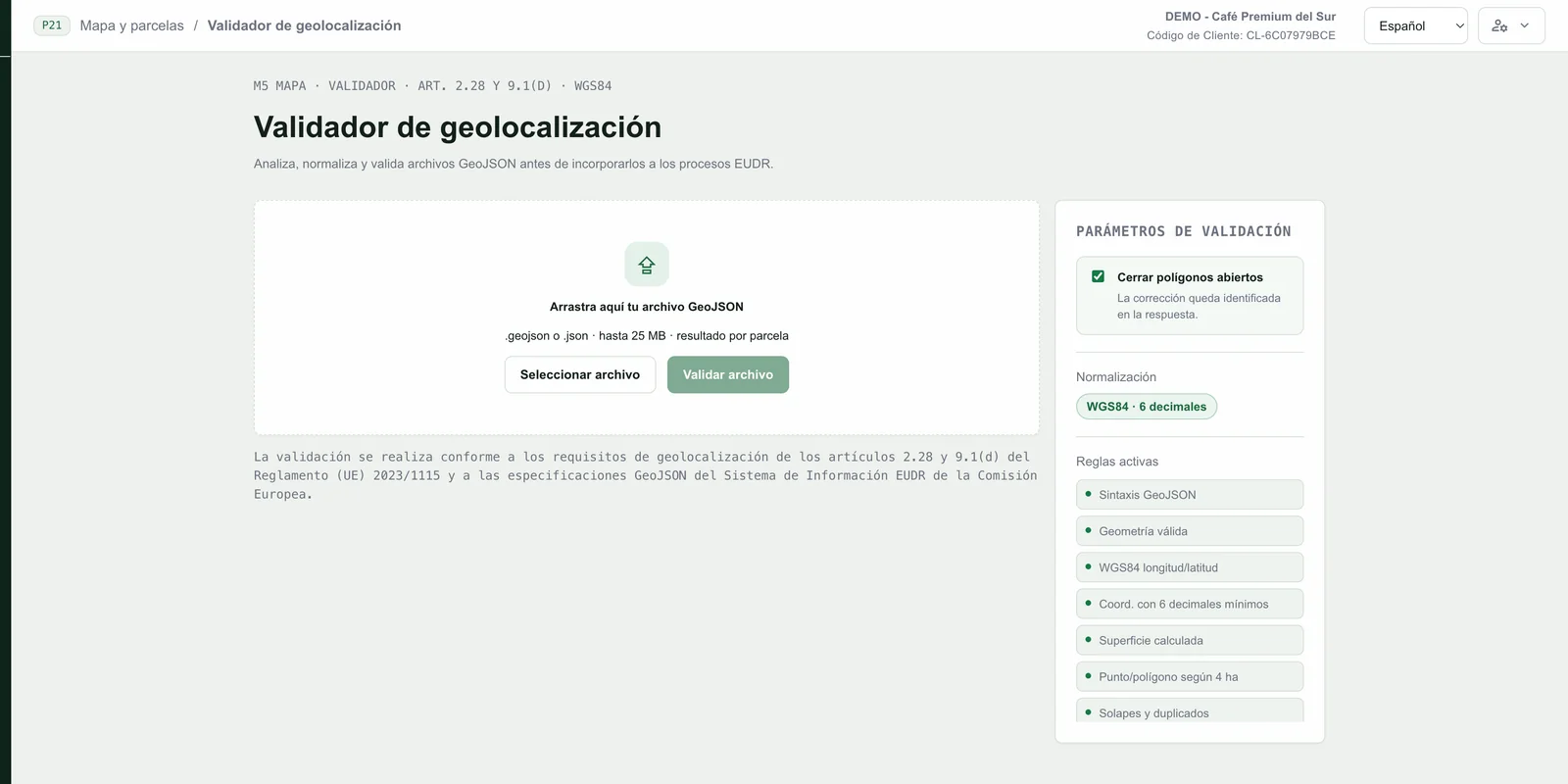
Before including the plots in a DDS it is worth validating the GeoJSON file. The Compliance Hub validator checks syntax, geometry, the WGS84 system, the six-decimal minimum, area, point or polygon type according to the 4 ha threshold, and overlaps and duplicates, and can close open polygons.
Before submitting: TRACES NT access and who can submit it for you
To submit a DDS you need to be registered in the information system (Art. 33). According to the authorities' guidance, the path is:
- Create an EU Login account, the Commission's identification service.
- Have an EORI number, mandatory if you import or export Annex I products.
- Register your company as an operator in TRACES NT and request access. The test environment (Acceptance) and production require separate registrations.
The Regulation allows someone else to submit the DDS for you. The operator may give a mandate to an authorised representative, but remains responsible for the product's compliance (Art. 6(1)). And a natural person or a micro-enterprise may give that mandate to a downstream operator or trader that is not a micro-enterprise, which cannot operate without submitting the declaration on its behalf (Art. 6(3)). The representative must hand over a copy of the mandate to the authority on request (Art. 6(2)).
How the DDS works inside TRACES NT: reference, 72 hours and API
When the DDS is submitted, the information system assigns a reference number (Art. 33(2)(b)) and a verification number, for security. The operator must pass the reference number on to downstream operators and traders in the following links (Art. 4(7)), and they keep it together with the data of their supplier when it is an operator (Art. 5(3)(a)). In practice, the easiest way is to include it on the invoice or delivery note of each shipment.
The technical documentation of the Commission's API (DDS service v3) clarifies how the declaration behaves once submitted:
- Amend or withdraw: the DDS can be amended or withdrawn within 72 hours of submission. An amendment keeps the same reference number. After that period, a change creates a new submission with a new identifier.
- Activity: each DDS states whether it is for import, export or domestic production (IMPORT, EXPORT or DOMESTIC).
- Geolocation: it is attached as base64 GeoJSON, with points or polygons and at least six decimals; net weight in kilograms is mandatory for import and export.
- Grouping declarations: a DDS can group others already submitted, always at the initial submission; grouped ones cannot be amended or withdrawn while the group is active.
- Internal reference: you can assign your own identifier, up to 50 characters, to locate the DDS in your systems.
- Statuses: the API distinguishes statuses such as SUBMITTED, AVAILABLE, REJECTED, WITHDRAWN or GROUPED.
To send declarations from your own software there is a web service with WS-Security authentication and an echo service to test the connection. If you do not want to develop it, a connected platform, such as Retexcycle Compliance Hub, does it for you.
Two details from the Commission's FAQ: a single DDS may cover several shipments over a period of about one year (FAQ 5.19), and products placed on the market before 30 December 2026 do not need a DDS (FAQ 8.2 and 9.2).
Micro and small producers: the simplified declaration
Micro and small primary operators do not submit a DDS per shipment. They are natural persons or micro and small enterprises, established in a country classified as low risk, that place on the market or export what they have grown, harvested or reared themselves (Art. 2(15a)). They submit a one-time simplified declaration with the Annex III data, receive an identifier and may replace geolocation with the postal address of the plot (Art. 4a).
From when the DDS must be submitted
| Who | Application |
|---|---|
| Large and medium-sized companies | 30 December 2026 (Art. 38(2)) |
| Operators that are natural persons, micro-enterprises or small enterprises, established as such on 31 December 2024 (except EUTR wood products) | 30 June 2027 (Art. 38(3)) |
| Downstream operators and traders, including micro and small ones (Art. 38(3) only mentions operators) | 30 December 2026 |
| New Annex I products (instant coffee, palm derivatives and frozen beef tongue) | 30 December 2027 (Delegated Regulation (EU) 2026/2102) |
Submit the DDS directly from Retexcycle
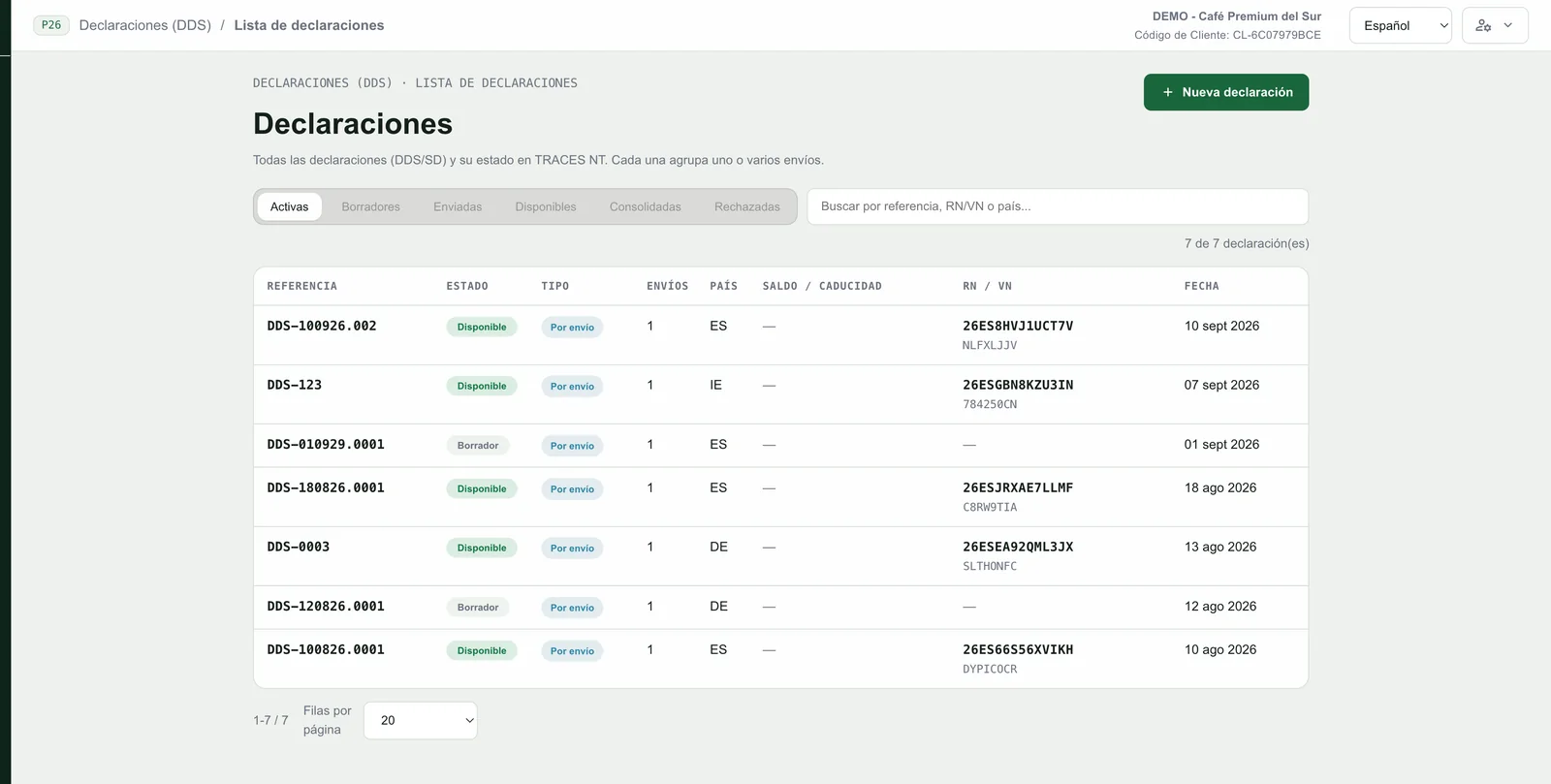
Preparing the DDS in spreadsheets and then transferring it by hand to the information system is where most errors are made: codes that do not match, missing plots, lost reference numbers. Retexcycle Compliance Hub is connected to TRACES NT to avoid this: it gathers the data you have already recorded, generates the DDS, validates the checks and sends it in a single step, keeping the reference.
- You receive the information already structured. Suppliers, shipments and plot geolocation come from your chain, with nothing to rebuild. If your suppliers use Retexcycle Origins, traceability arrives verified from the farm.
- The DDS is generated with the Annex II data from each shipment.
- The checks are validated before sending: if something is missing, you see it before declaring, not after.
- It is sent to TRACES NT in a single step from the platform, and the reference number (RN) and verification number (VN) are saved with the declaration.
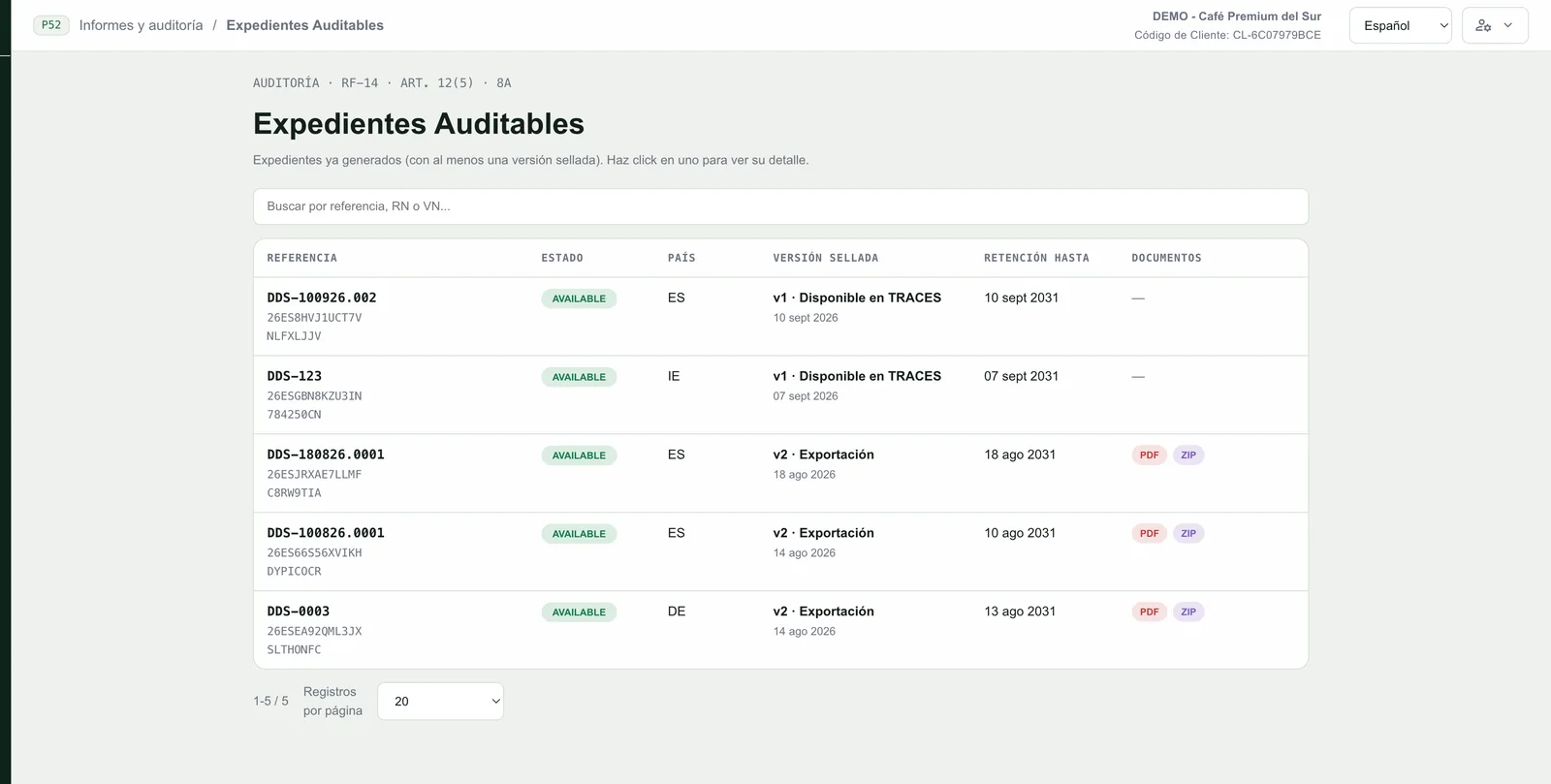
- The auditable file remains: each declaration is kept with its sealed version and retention date, so you can handle an inspection without redoing anything.
Common mistakes when preparing a DDS
- Data that does not match customs: Harmonised System code or quantity different from the import declaration.
- Incomplete geolocation: plots of the batch are missing, there are fewer than six decimals or a point where a polygon is required.
- Mixed batches: the Commission does not accept mass balance; a batch mixed with a deforested plot is non-compliant (FAQ 1.4 and 1.5).
- Not passing on the reference number to the next link (Art. 4(7)).
- Signing before closing the risk: the DDS states that there is no risk or that it is negligible.
- Not keeping the DDS record for 5 years (Art. 4(3)).
How to prepare the DDS in five steps
- List your products with their Harmonised System code and check that they are in Annex I.
- Gather the information per batch (Art. 9): supplier, quantity, country of production, plot geolocation and evidence of legality.
- Assess and, if necessary, mitigate the risk (Arts. 10 and 11), including the classification of the country of production. Document it.
- Generate the DDS with the Annex II data and check EORI, code and quantity against the customs documentation.
- Submit it, note the reference number, pass it to the next link and archive the record for 5 years.
Retexcycle Compliance Hub · Origins
Generate your DDS and send it to TRACES NT without spreadsheets
From data at origin to the submitted declaration: validation of checks, direct sending to TRACES NT and an auditable file. Request a demo with your real case.
Frequently asked questions about the EUDR DDS
What is the DDS under the EUDR?
It is the due diligence statement: the electronic document that the operator submits in the Commission's information system (TRACES) to confirm that it exercised due diligence and found no risk, or only a negligible one, that the product does not comply with the EUDR (Art. 4(2) and Annex II).
Who has to submit the due diligence statement?
The operator: whoever places an Annex I product on the EU market or exports it. Downstream operators and traders do not submit it; they collect and keep the data of their suppliers and customers and the reference numbers (Art. 5). Micro and small primary operators submit a one-time simplified declaration (Art. 4a).
What data does the DDS include?
According to Annex II: the operator's name and address and its EORI number when the product enters or leaves the market; Harmonised System code, description and quantity; country of production and geolocation of all plots; the operator's statement text and the signature with name, role and date.
Can the DDS be submitted directly from software?
Yes. The Commission's information system is designed so that declarations are submitted by electronic means (Art. 4(2)). Retexcycle Compliance Hub generates the DDS from the data you already have on the platform, validates the checks and sends it to TRACES NT in a single step, keeping the reference number.
What is the DDS reference number and who must it be communicated to?
It is the number the information system assigns to each submitted DDS (Art. 33(2)(b)). The operator must communicate it to the downstream operators and traders in the chain (Art. 4(7)), who keep it together with the data of their supplier (Art. 5(3)).
How many decimals and what format must geolocation have?
Latitude and longitude coordinates with at least six decimals. Plots of more than four hectares, except those for cattle, are declared with a polygon (Art. 2(28)). The Commission's FAQ (v5, April 2026) indicates GeoJSON in WGS84.
How long must the DDS be kept?
The DDS record, five years from its submission in the information system (Art. 4(3)). The information and evidence supporting it, five years from placing the product on the market or exporting it (Art. 9(1)).
Can a DDS be amended or withdrawn?
Yes, within 72 hours of its submission. An amendment within that period keeps the same reference number; after that, a change generates a new submission with a different identifier (technical documentation of the Commission's API, DDS service v3).
Can another company submit the DDS for me?
Yes. The operator may give a mandate to an authorised representative to submit it on its behalf, although it remains responsible for compliance (Art. 6). A natural person or a micro-enterprise may give that mandate to a downstream operator or trader that is not a micro-enterprise.
What is the DDS verification number?
It is a security code that the system assigns together with the reference number when the declaration is submitted. Both are needed to retrieve the full content of a DDS through the Commission's API.
Can a small producer submit a simplified declaration?
Yes, if it is a natural person or a micro or small enterprise, is established in a low-risk country and sells or exports what it has grown, harvested or reared itself. It submits a one-time declaration with the Annex III data and receives an identifier; the postal address of the plot may replace geolocation (Art. 4a).
What happens if I place a product on the market without a DDS?
You cannot place it on the market or export it (Art. 4(2)). Penalties must be effective and dissuasive: fines with a maximum of at least 4% of annual EU turnover, confiscation of the product and of the revenue, and exclusion from public procurement for up to 12 months (Art. 25).
Verified in October 2026 against the consolidated text of Regulation (EU) 2023/1115 (18/09/2026), the technical documentation of the Commission's API (DDS service v3) and the Commission's FAQ (v5, April 2026). The screenshots are demos. Informational summary, not legal advice. Sources: Regulation (EU) 2023/1115; Regulation (EU) 2025/2650; Delegated Regulation (EU) 2026/2102.